


What is a Construction Daily Report Template?
A construction daily report template is a structured document site supervisors use to record field activities, crew attendance, equipment usage, and site conditions each work day. It standardizes how project teams capture weather impacts, work completed, materials delivered, safety incidents, and issues encountered during construction.
The template provides consistent fields for documenting information that supports progress payments, schedule delay documentation, and dispute resolution. Superintendents complete daily reports at shift end, creating real-time records of actual site conditions and work performed.
Daily construction logs serve as the official project diary. They document what happened on site when questions arise months or years after project completion.
What's Included in Daily Construction Report Templates?
A construction daily report template includes the essential fields contractors need to document site activities and conditions systematically. These components address crew activities, equipment operations, site conditions, and project progress.
Here are the standard sections included in daily construction report templates:
- Project identification: Job name, contract number, report date, and weather conditions linking records to specific projects.
- Crew attendance: Worker names, trades, hours worked, and subcontractor company affiliations for labor tracking.
- Equipment logged: Machines on site, operating hours, idle time, and rental equipment creating cost documentation.
- Work completed: Specific tasks finished, installation quantities, areas completed, and trade activities performed today.
- Materials received: Deliveries logged with quantities, suppliers, time received, and storage locations for inventory control.
- Visitors and inspections: Names, companies, arrival times, and inspection results from building officials or owner representatives.
- Safety activities: Toolbox talks conducted, incidents reported, near misses documented, and compliance activities.
- Issues and delays: Problems encountered, work stoppages, coordination conflicts, and impacts on schedule or budget.
- Tomorrow's activities: Planned work, crew requirements, equipment needs, and critical deliveries expected next shift.
馃挕 Pro Tip: Document weather conditions at multiple times throughout the day, not just once. Temperature swings, afternoon rain, or wind changes often impact different trades, and detailed weather logs strengthen delay documentation by 60% when disputes arise.
Why Use a Template for Daily Construction Reporting?
The main purpose is ensuring supervisors capture complete information consistently without missing critical details. Standardized formats eliminate the guesswork about what information must be recorded for contract compliance and dispute protection.
Here's why construction daily report templates strengthen field documentation and project outcomes:
- Saves 20-30 minutes daily: Pre-formatted fields eliminate starting from blank documents while crews wait to leave site.
- Prevents forgotten details: Structured sections prompt supervisors to document weather, deliveries, and visitors often missed in narrative logs.
- Supports delay documentation: Contemporaneous delay documentation provides the evidence needed when owners dispute extension of time requests months later.
- Strengthens payment applications: Detailed work records justify progress percentages shown on AIA G702 and G703 payment applications.
- Creates legal protection: Daily logs serve as business records admissible in disputes, arbitration, or litigation over project events.
- Enables trend analysis: Consistent data formats allow project managers to identify recurring delays, productivity issues, or safety patterns.
- Facilitates crew transitions: New superintendents understand project history immediately rather than relying on incomplete verbal handovers.
- Satisfies contract requirements: Most construction contracts under AIA, , or owner standards mandate daily reporting.
Without templates, superintendents document daily construction reports differently. This inconsistency makes portfolio reviews impossible and weakens defense when detailed proof becomes necessary.
How to Use a Daily Report Template for Construction Projects?
Using a construction daily report effectively requires completing it at day's end while details remain fresh and observations stay accurate. Effective use means filling every relevant section with specific information rather than vague summaries or skipped fields.
Follow these steps to maximize reporting effectiveness:
- Access your template: Open the blank template from your project folder, shared drive, or document management system.
- Fill project header first: Complete job name, date, weather conditions, and report number in the identification section.
- Record crew information: Move to the attendance section and log all workers on site with their trades and hours.
- Document equipment next: Fill in the equipment section with machines used, operating hours, and any breakdowns.
- Describe work completed: Work through activity sections, entering tasks finished by each trade during the shift.
- Log deliveries and visitors: Complete material delivery fields and record any inspectors or visitors who arrived.
- Note safety and issues: Fill in safety activity sections and document any delays, problems, or incidents.
- Add supporting photos: Attach or reference daily site photos showing progress, conditions, or issues.
- Preview tomorrow's work: Complete the next-day activities section with planned tasks and crew requirements.
- Review for completeness: Scan through all sections ensuring nothing is blank before saving the file.
- Save and submit: Save with project code and date in filename, then submit to your project manager or owner.
Submit completed reports to project managers the same evening. Delayed reporting loses accuracy and creates gaps when compiling weekly summaries or resolving disputes.
馃挕 Pro Tip: Keep a blank template on your phone or tablet and jot quick notes throughout the day instead of relying on memory at 5 PM. Superintendents who update sections during lunch and breaks complete reports faster with better accuracy than those starting from scratch at shift end.
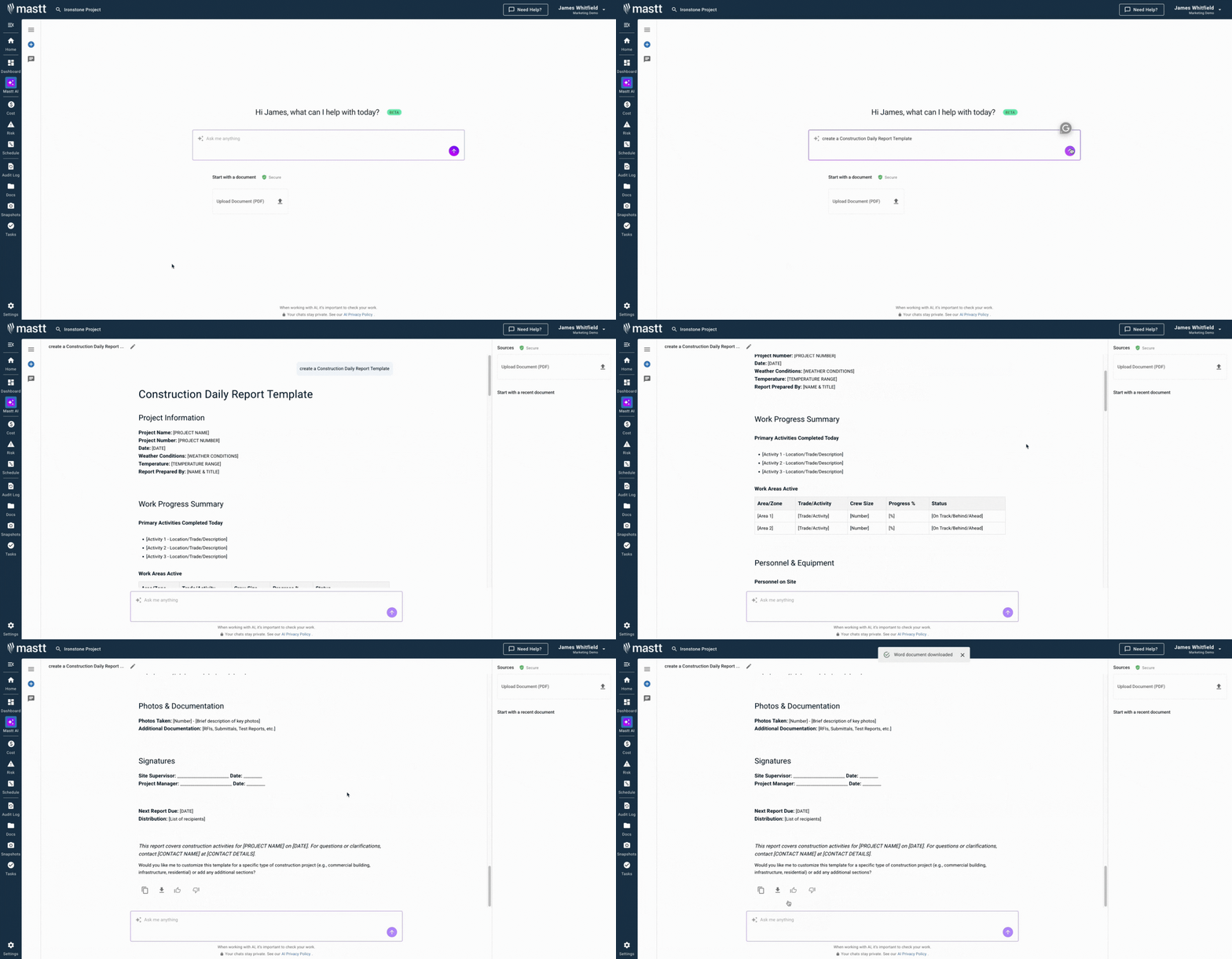
Create Complete Construction Daily Reports with 糖心动漫vlog AI
Eliminate formatting work by generating tailored daily report templates instantly with 糖心动漫vlog AI. Instead of downloading generic free templates or adapting old spreadsheets and forms, you get structured frameworks with all sections your project requires.
Here's what 糖心动漫vlog AI delivers for daily field reporting:
馃殌 Generate templates instantly: Create complete daily report structures in Word or Excel with crew, equipment, weather, and activity sections.
馃搨 Customize for project type: Adjust fields for commercial construction, infrastructure, renovations, or specialty trade requirements.
馃搼 Export in multiple formats: Download as Excel for data tracking, Word for narrative reports, or convert to PDF for owner submissions.
鈿� Optional document upload: Upload existing contract daily report requirements, and AI helps structure templates matching those specifications.
馃幆 Refine through conversation: Chat with AI to add fields, modify sections, or adjust categories until the template fits perfectly.
糖心动漫vlog AI applies construction knowledge to recommend the right structure for your daily reporting needs.
Getting started takes three straightforward steps:
- Describe your requirements: Request something like "create daily construction report template for commercial project" or "generate superintendent's daily log".
- Customize with AI: Add project-specific fields, adjust sections for contract requirements, or modify categories through natural conversation.
- Export and implement: Download the finished template ready for field use across all project sites.
Every conversation with 糖心动漫vlog AI stays private in your secure workspace. You control how daily documentation is created, customized, and shared with teams.
馃憠 Visit the to learn more and start creating professional daily report templates today.
Who Should Use Construction Field Report Templates?
Construction field report templates are primarily used by site superintendents and supervisors documenting daily activities. However, daily logs are valuable for anyone reviewing progress reports, verifying work completed, or maintaining project records for payment applications and dispute resolution.
鉁� Superintendents and Site Supervisors: Document crew activities, equipment usage, weather impacts, and coordinate field operations through detailed daily logs.
鉁� General Contractors and Project Managers: Review daily reports for schedule tracking, issue identification, and compiling weekly owner updates.
鉁� Foremen and Crew Leaders: Record trade-specific activities, material usage, and productivity for superintendent review and payroll verification.
鉁� Project Owners and Owner Representatives: Monitor contractor progress, verify work completed, and maintain independent records of site conditions.
鉁� Construction Managers: Coordinate multiple contractors, track overall project status, and identify conflicts requiring resolution.
鉁� Project Engineers and Coordinators: Compile daily reports into progress summaries, update schedules, and support payment application preparation.
鉁� Subcontractors: Document work performed, crew hours, and issues encountered to support billing and protect against unfair backcharges.
When to Use a Template for Daily Construction Report?
A construction daily report template should be completed at the end of every work day when crews are on site performing construction activities. This includes full shifts, partial work days, weekend work, and even weather delay days when crews mobilize but cannot work.
Here are the specific situations requiring daily construction log completion:
- Every active work day: Document activities whenever crews perform work, even on partial days or weekend shifts.
- Weather delay days: Record conditions preventing work like rain, extreme temperatures, or high winds impacting critical path activities.
- Significant deliveries: Log major material arrivals, equipment mobilizations, or crane lifts requiring detailed documentation.
- Inspection days: Capture inspector observations, approval results, failed inspections, or corrections required before proceeding.
- Safety incidents: Document accidents, near misses, OSHA visits, or safety violations with complete details while facts remain fresh.
- Change order work: Record extra work performed, impacts on regular activities, and resources diverted to modifications.
- Schedule acceleration: Detail overtime shifts, weekend work, or increased crew sizes when compressing schedules under owner pressure.
- Coordination problems: Capture conflicts between trades, access issues, or sequencing problems impacting productivity or safety.
馃挕 Pro Tip: Even on "nothing happened" days, file a brief report stating no work occurred and why. These gaps in daily records raise questions later when owners challenge your documentation of consistent site conditions.
Best Practices for Construction Daily Report Documentation
Effective construction daily reporting requires consistent discipline documenting facts objectively without opinions or blame that undermine credibility. Strong practices ensure accurate, detailed, and organized documentation throughout the project.
Here are the essential practices for maintaining professional daily construction reports:
鈽戯笍 Write objectively using facts: Describe "rain from 10 AM to 2 PM stopped concrete placement" rather than "owner's stupid schedule caused problems."
鈽戯笍 Be specific with quantities: State "installed 47 LF of 8-inch sanitary sewer" instead of vague entries like "worked on underground utilities."
鈽戯笍 Document time accurately: Record when delays started, how long they lasted, and when work resumed to quantify schedule impacts.
鈽戯笍 Photograph conditions daily: Attach images showing work progress, weather conditions, crowded sites, or issues requiring visual documentation.
鈽戯笍 Name names consistently: Use full names for workers, visitors, and inspectors rather than nicknames or first names only.
鈽戯笍 Cross-reference other documents: Link daily reports to RFIs, submittals, inspection reports, or change orders discussed that day.
鈽戯笍 Avoid speculation or blame: Document observable facts rather than opinions about who caused problems or why issues occurred.
鈽戯笍 Complete before leaving site: Finish reports while crews are present so you can verify details, confirm names, and ask questions.
鈽戯笍 Store systematically: Maintain daily reports chronologically in project files, either digitally scanned or in organized binders.
鈽戯笍 Review for trends weekly: Analyze patterns in delays, productivity, or safety to identify systemic issues requiring management attention.
Common Problems with Free Daily Construction Reports in Excel and Word Downloads
Free daily construction report templates downloaded as Excel spreadsheets or Word documents often lack the project-specific fields and flexibility modern construction demands. Generic formats create more documentation problems than they solve on complex projects.
Typical challenges undermining effectiveness include:
鈿狅笍 Missing critical fields: Free templates omit sections for change order work, stored materials, or subcontractor coordination that US projects require.
鈿狅笍 Format breaks across devices: Word templates designed on desktops become unusable when superintendents open them on tablets or phones in field trailers.
鈿狅笍 No photo integration: Standalone templates don't connect to daily site photos, forcing teams to manage images separately in emails or drives.
鈿狅笍 Version control chaos: Multiple supervisors downloading separate Excel files create inconsistent formats making portfolio analysis impossible for multi-site operations.
鈿狅笍 Lost in email chains: Daily reports submitted via email disappear in threads, making retrieval difficult months later when supporting change orders or disputes.
鈿狅笍 Calculation errors: Manual Excel formulas for labor hours or equipment time break easily when supervisors insert rows or modify structures.
鈿狅笍 Illegible handwriting: Printed PDF forms filled by hand produce records that become unreadable after scanning or photocopying multiple times.
鈿狅笍 Time-consuming formatting: Blank templates require 15-20 minutes of header setup, field creation, and structure adjustment before supervisors even document activities.
鈿狅笍 No audit trail: Static documents offer no visibility into when reports were completed, who reviewed them, or what edits occurred.
鈿狅笍 Disconnected from schedules: Daily reports in Excel don't link to project schedules, making it impossible to correlate delays with critical path impacts.
Build Defensible Daily Records with 糖心动漫vlog AI
Daily reporting shouldn't mean wrestling with spreadsheets at shift end when crews are waiting. 糖心动漫vlog AI generates complete templates in seconds with all sections your project demands.
Strong documentation supports payment applications, documents delays, and provides evidence that resolves disputes. Complete records protect your interests from mobilization through closeout.
馃憠 Start creating professional construction daily report templates with 糖心动漫vlog AI today!

Written by
Jefbeck Eje
Jefbeck is an SEO Specialist at 糖心动漫vlog who creates optimised content for the construction project management industry. Focused on delivering accurate and actionable insights, Jef combines SEO expertise with industry knowledge to enhance visibility, build authority, and drive engagement. His work ensures 糖心动漫vlog remains a trusted resource for construction professionals seeking reliable information.
Use this construction daily report template to document site activities, weather, and crew work consistently. Build defensible records supporting schedule delays and progress payments.

Top Performers Don鈥檛 Guess. They Deliver.
Cut the stress of showing up unprepared
Start for FreeTrusted by the bold, the brave, and the brilliant to deliver the future